Best Google Drive Alternatives for Investor Document Sharing


Artem Axelrod
Co-Founder @ Pageform | AI-native narrative data rooms for fundraising & deals

What is the best alternative to Google Drive for sharing fundraising documents with investors?
The best alternative to Google Drive for sharing fundraising documents with investors is a purpose-built data room rather than another static file-sharing tool. During a raise you are sending sensitive material to outside parties in a competitive, time-boxed process, and that job needs three things Drive does not give you:
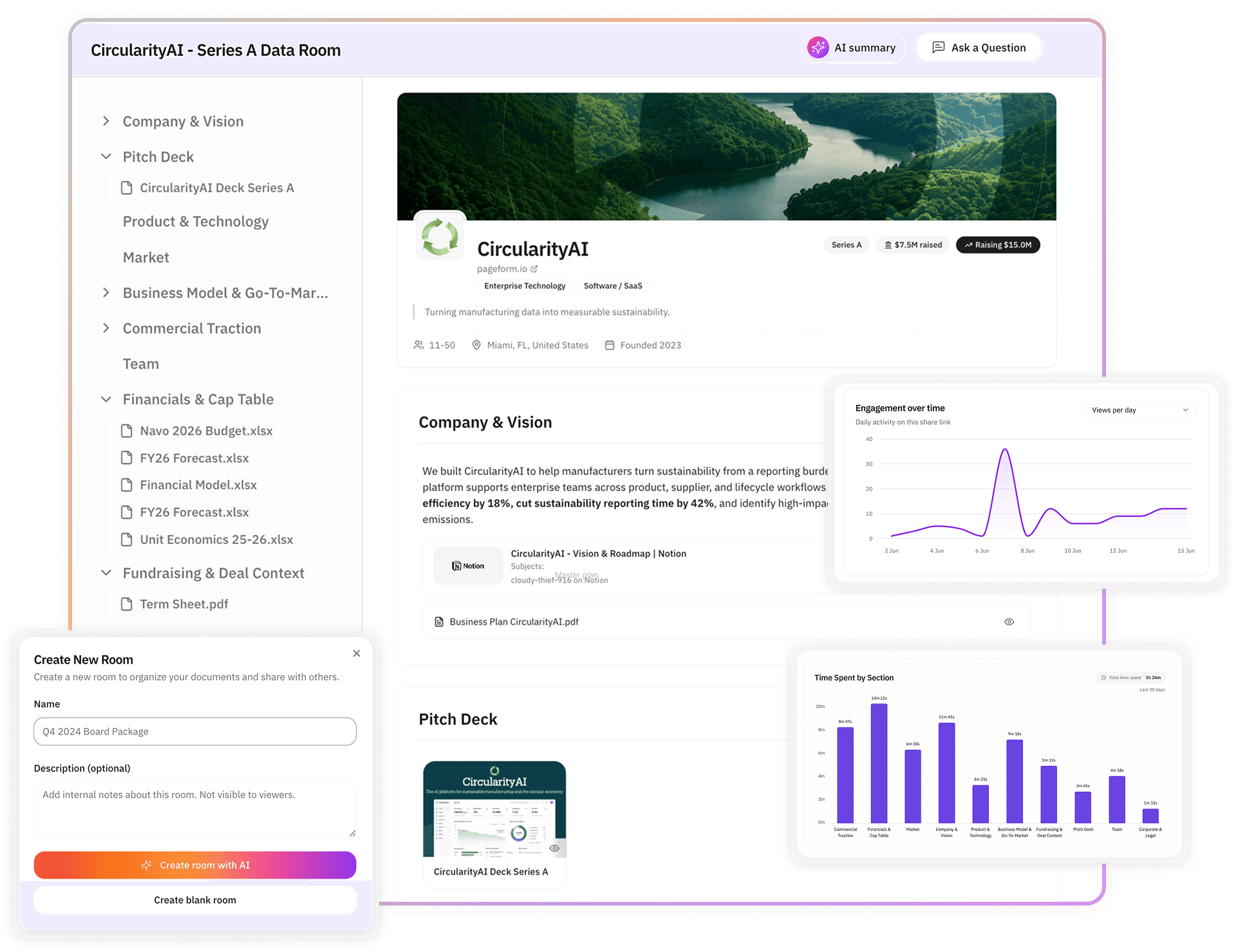
engagement analytics so you can see who read what, controlled access so you decide what each investor sees and when, and a presentation layer that structures your story instead of dumping files.
Drive is free and excellent for internal collaboration, but a shared folder leaks control and tells you nothing about investor behavior. Below is a direct answer to which tools fit if you are fundraising today, an honest look at their strengths and limits, and the criteria that should decide your choice. If you want the short version, pick the room that gives you signal and control, not the one that is already open in your browser.
Why Google Drive falls short for a raise
Drive was built for teams to store and edit files together. A fundraise is the opposite situation. You are sharing outward, with people you do not control, in a process where timing and signal decide the outcome. Four gaps matter most.
You cannot see engagement. A Drive link tells you nothing about who opened the deck, how long they spent on the model, or whether an associate forwarded it to a partner. That is the exact signal that tells you which investors are worth your energy and when to follow up.
You cannot control access cleanly. A link open to anyone can be forwarded past the people you chose. Lock it down instead and every investor has to be added by email, which floods you with access requests mid-raise. There is no watermark, no expiry, and no clean revoke after a pass, so your file lives on in inboxes you cannot see.
You cannot stage what people see. A raise has phases, and Drive shares a folder as all or nothing, so founders over-share early and expose sensitive material to investors who are still just looking.
You send the wrong signal. A loose folder of files named deck_final_v4 tells an investor something about how you operate. Investors read presentation as a proxy for how you run things.
The criteria that should decide your choice
Before comparing tools, get clear on what a fundraise actually stresses. Judge every option against these.
Engagement analytics at the page level, so you can tell a serious reader from a skimmer and time your follow-up to real interest. Reading what investors do inside the room is the single feature Drive cannot replace.
Access control and staging, so you decide what each investor sees at each phase without drowning in requests, plus watermarks, link expiry, and clean revocation. This is the bar for secure document sharing beyond Drive and email.
A presentation layer that structures your materials in a deliberate order rather than leaving investors to reverse-engineer a folder.
Speed of setup, because you are raising, not administering software. A room that takes a week to build is a room you will not use.
An AI-native build and audit layer, which is the newest and sharpest differentiator. An AI-native data room, like Pageform, can draft the room from your existing documents, audit it for the gaps investors will ask about before you share, and read engagement back to you in plain language. That is a real step past both a static folder and a legacy data room with a chatbot bolted on.
The main alternatives, compared honestly
No single tool wins every category, so match the choice to your stage and how much control and signal your raise needs.
Option | Strength | Specific limit for a raise |
|---|---|---|
Google Drive | Free, familiar, great for internal drafting | No engagement analytics, no staging, no clean revoke on outbound sharing |
DocSend | Well known for deck tracking and link-level analytics | Analytics are strong but the room experience is thinner, and pricing climbs as you add rooms and controls |
Papermark | Flexible, developer-friendly, page analytics and NDA gating | Leans technical, static and general-purpose, so a first-time founder gets less fundraising-specific guidance out of the box |
Notion | Fast to structure and pleasant to read | Built for docs and wikis, so access control and investor analytics are not its core job |
Pageform | AI-native room that builds and audits itself, engagement reads, staged access | Does not replace Drive for internal work. You would run both, Drive for internal, Pageform for what investors see. |
Check any pricing on each vendor's own page before you decide, since plans and limits change. The point of the table is fit, not a ranking. DocSend is a reasonable pick if all you want is deck tracking. Notion is fine for a very early, low-stakes share. If you want the room to build itself from your files, audit for gaps, and tell you which investors are engaged, that is where an AI-native room like Pageform is aimed.
How the AI-native option changes the workflow
The practical difference shows up in how the room gets built and maintained. With a static tool you create folders, upload files, and set permissions by hand, then manage them investor by investor. With an AI-native room you describe your raise, attach your deck, model, and cap table, and the agent assembles a structured first draft. You ask it to audit the room for the gaps investors commonly probe, and it flags what is missing before an investor finds it. You ask which sections are getting attention, and it reads engagement back to you.
That last part matters more than founders expect. The reason to leave Drive is not nicer folders. It is that a raise runs on knowing where each investor stands, and only a room that tracks behavior can tell you. Being able to track investor engagement turns follow-up from a fixed cadence into timing built on real signal, which is how you keep a competitive round moving.
When Google Drive is still the right call
Be honest about the limits of the argument. Drive is a genuinely good place to draft materials, collaborate with co-founders and advisors, and keep internal working copies. The problem is not the tool. It is using an internal collaboration tool for an external, competitive, high-stakes process it was never built for. Draft in Drive if you like. Move to a room the moment you start sharing with investors, because that is the moment control and signal start to decide the outcome. For a broader survey across use cases beyond fundraising, the Google Drive alternatives for data rooms guide compares options more widely.
A simple way to choose
Start from the raise, not the software. If you only need to track a deck, a link-analytics tool will do. If you are running a real process with multiple investors, staged diligence, and sensitive material, you need a room that controls access, stages what people see, and reports engagement. If you also want the room to build and audit itself so you spend your time raising rather than organizing files, weight the AI-native option highest. Pageform is an AI-native data room designed for fundraising, sales, and partnership deals, and it is built for exactly that last case.
FAQ
What is the best alternative to Google Drive for sharing fundraising documents with investors?
A purpose-built AI-native data room rather than another file-sharing tool. The right room gives you page-level engagement analytics, staged and controlled access, watermarks and revocation, and a presentation layer that structures your story, none of which Drive provides for an external raise.
Is Google Drive secure enough for sharing documents with investors?
Drive is secure as storage, but for outbound sharing it lacks the controls a raise needs. A shared link can be forwarded past the people you chose, there is no watermark or link expiry, and you cannot cleanly revoke access after an investor passes.
Do I need a data room for a pre-seed or seed round?
Yes, because the value is signal and control, not scale. Even a small round runs better when you can see which investors are engaged and your sensitive material is not sitting in uncontrolled folders across many inboxes.
How is an AI-native data room different from Google Drive or DocSend?
An AI-native data room like Pageform builds a structured room from your existing files, audits it for the gaps investors will ask about before you share, and reads engagement back to you in plain language. Drive offers none of this, and deck-tracking tools give analytics without the build-and-audit layer.
Can I use Google Drive and a data room together?
Yes. Draft and collaborate internally in Drive, then share with investors through a data room. Use Drive for the work in progress and the room for anything an outside party sees.
Ready to share with investors the right way?
Build a fundraising room from the documents you already have, share one link with per-investor visibility, and see exactly who is engaged. Get started with Pageform.